Leawo PowerPoint to DVD Pro is a professional PowerPoint to DVD converting software combo that could convert PowerPoint to video and burn PowerPoint to DVD/Blu-ray. This guide shows you how to use Leawo PowerPoint to DVD Pro in detail.
Leawo PowerPoint to DVD Pro is a combination of PowerPoint to video converter, PowerPoint to DVD burner and PowerPoint to Blu-ray burner software. It could convert PowerPoint to video, burn PowerPoint to DVD and burn PowerPoint to Blu-ray disc (and/or ISO image file). The internal disc menu designer allows you to convert PPT to DVD with menu, while the internal background music adder enables you to burn PPT to DVD with music as well.
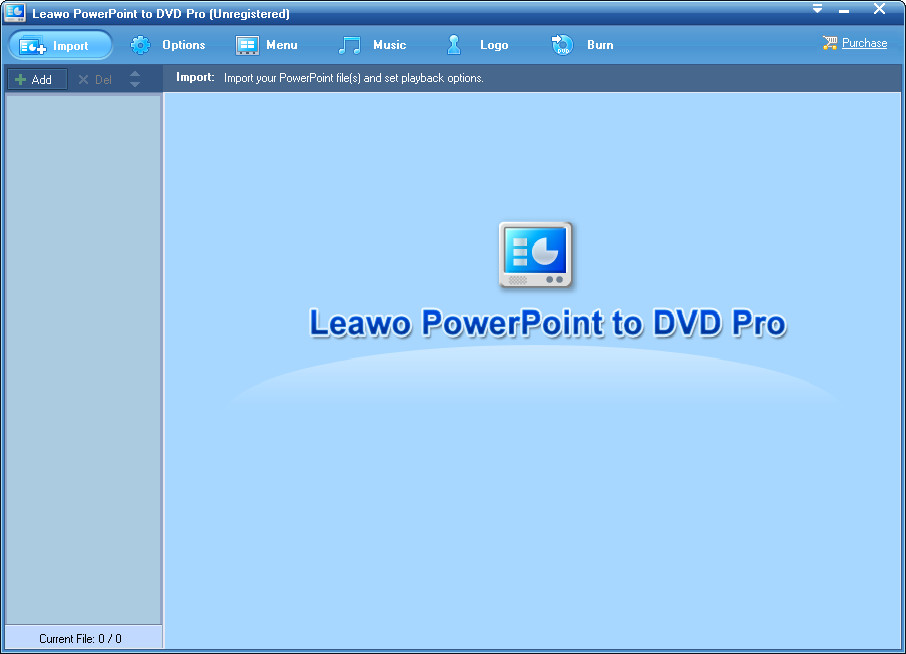
Leawo PowerPoint to DVD Pro is very easy to use. The Home interface is quite clean and simple to understand. The whole Home interface comprises several parts: Import, Options, Menu, Music, Logo and Burn.
Import part: Click the Import button  to open the import panel where you could import source PowerPoint files into this PowerPoint to DVD converter.
Options panel: Click the Options button  to choose what you want to do with Leawo PowerPoint to DVD Pro: convert PowerPoint to Video, Burn PowerPoint to DVD, or Burn PowerPoint to Blu-ray disc. Each option offers you several detailed settings.
Menu part: Click the Menu button  to add a disc menu for output DVD/Blu-ray content if you choose to burn PowerPoint to DVD/Blu-ray under the Options part. The Menu part would become unavailable if you choose to convert PowerPoint to video under the Options part.
Music part: No matter you choose to burn PowerPoint to DVD/Blu-ray or convert PowerPoint to video, you could click the Music button  on the menu panel to add background music to output file.
Logo part: Click the Logo button  to add an image watermark as your own logo to output video/DVD/Blu-ray content.
Burn part: Click the Burn button  to finish conversion settings and start converting PowerPoint to video or burning PowerPoint to DVD/Blu-ray content.
You could also see a Purchase button  on the home interface, by clicking which you could purchase the license code of Leawo PowerPoint to DVD Pro for registering and activating. With a license code, you could get unlimited user experience. (The registration part would show you the limitations if you don’t register and activate it.)
You may come across various problems while using Leawo PowerPoint to DVD Pro. You could get help from Leawo Software by clicking the Help button  on the top-right corner.
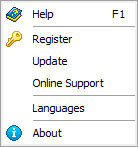
The drop-down help center lists several support methods for you: Help, Register, Update, Online Support, Languages and About.
Help (shortcut key - F1): Click it to visit Leawo PowerPoint to DVD Pro’s online user guide: https://www.leawo.org/powerpoint-to-dvd-pro/user-guide.html.
Register: Click it to open the register window for registering (the registration part below would show you how to register Leawo PowerPoint to DVD Pro).
Update: Click to check whether there is a new version for you to update.
Online Support: Click to visit Leawo’s Online Support Center for more help https://www.leawo.org/support/.
Languages: Click to set the program interface language from English, Japanese, Deutsch, and Russian.
About: Click to view detailed version information of Leawo PowerPoint to DVD Pro.