

How to use Leawo PowerPoint to DVD Pro
Learn how to register Leawo PowerPoint to DVD Pro in different situations to convert PowerPoint to video and burn PowerPoint to DVD/Blu-ray without limitation.


- Home
- /
- Leawo PowerPoint to DVD Pro
- /
- User Guide
How to Register Leawo PowerPoint to DVD Pro
Leawo Software offers both trial version and registered version of Leawo PowerPoint to DVD Pro. Both versions are free to download and install. With a license code, you could register Leawo PowerPoint to DVD Pro to experience full features without any limitation.
1. Why should you register?
There are limitations on the trial version: The English trial version of Leawo PowerPoint to DVD Pro will convert PowerPoint to video and burn PowerPoint to DVD/Blu-ray content with watermark attached. And the Japanese trial version of Leawo PowerPoint to DVD Pro supports only ASF, WMV, 3GP and 3G2 output at 320*240 without watermark. If you try to output PowerPoint to video in other formats or other sizes with Leawo PowerPoint to DVD Pro (Japanese version), the output file would come out with watermark. Meanwhile, it only supports processing 1 task at a time.
2. Register Leawo PowerPoint to DVD Pro with License
Once you get a license code of Leawo PowerPoint to DVD Pro, upon the launch, you will see a window as below:
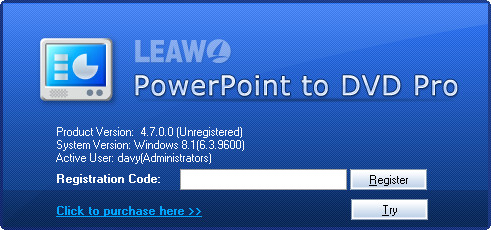
You need to enter the license code into the Registration Code box and then click the Register button  to register and activate Leawo PowerPoint to DVD Pro. To call out the registration window, you could also click the Help button
  on the top-right corner of home interface and then click the Register option.
3. Register Leawo PowerPoint to DVD Pro without License
How to register Leawo PowerPoint to DVD Pro if you haven’t got a license code? You need to firstly get a license code. You could click the Purchase button  on the home interface, or directly visit Leawo PowerPoint to DVD Pro purchase page: https://www.leawo.org/powerpoint-to-dvd-pro/purchase.html to purchase a license code. You could purchase either 1-Year license code or Lifetime license code. The license code would be sent to you via email. You could then copy and paste the license code to register Leawo PowerPoint to DVD Pro as mentioned above.