



 Try for Free
 Try for Free


With the emergence and rise of various streaming video websites, we can enjoy many high-quality and original movies and TV shows online. Among them, due to its low subscription price, high service quality and other advantages, Paramount Plus has become a reliable choice for many people to kill time in their daily lives. So, does Paramount Plus allow downloads? In fact, Paramount Plus App launched the offline function a long time ago, allowing users to download Paramount Plus videos and watch them offline. However, the videos we download by using the download method provided by Paramount Plus App have an effective viewing time. So, how long do downloads last on Paramount Plus? Do you want to use other methods to keep Paramount Plus downloads permanently on your device so that you can continue to watch them even if you no longer subscribe to Paramount Plus? Perhaps you can get these answers by reading this tutorial, because I will specifically introduce how long do Paramount Plus downloads last and the best Paramount Plus video downloader which can help people keep Paramount Plus downloads permanently.
Outline
Part 1:How Long Do Paramount Plus Downloads Last?
By paying Paramount Plus a monthly fee of $10.99, we can become a Paramount Plus premium member, which gives us access to the offline feature of the Paramount Plus App. By using the offline feature in the Paramount Plus App, we can download Paramount Plus videos to our devices and enjoy them offline. Unfortunately, Paramount Plus downloads often have a maximum validity period of 30 days, and it starts from the day you finish downloading the Paramount Plus video. After the time limit, the Paramount Plus downloads you downloaded will be automatically removed from the download library by the Paramount Plus App, but you can download them again. In addition, once you start watching a downloaded Paramount Plus video, the valid usage time of this Paramount Plus video will be shortened to 48 hours. What's worse is that regardless of whether the Paramount Plus video has been fully viewed, it will be automatically deleted from the Paramount Plus download library after 48 hours.

Part 2: Where to Find Paramount Plus Downloads?
Generally speaking, the Paramount Plus App will save the data generated by users' daily use directly in the device, including the Paramount Plus videos downloaded by users by using the offline function. However, Paramount Plus does not tell us the specific save path of the downloaded Paramount Plus videos in the internal storage of the device. Therefore, it is difficult for us to find the Paramount Plus downloads in the internal storage of the device. Fortunately, we can find the Paramount Plus videos we have downloaded directly under the "Download" or "Offline" heading in the Paramount Plus App. By clicking on the video icon, we can start offline playing and enjoy these Paramount Plus videos.

Part 3: How to Keep Paramount Plus Downloads Permanently?
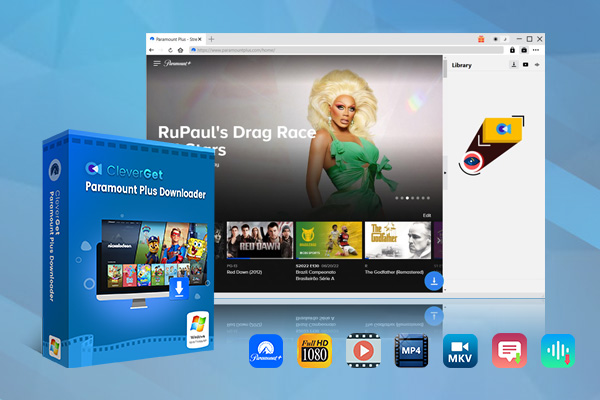
The offline feature of Paramount Plus App has been launched for a long time, but people found that Paramount Plus download limits not only did not improve, but became more and more. Paramount Plus even limits which Paramount Plus videos we can download. Therefore, whether you want to save Paramount Plus downloads permanently on your device, download videos on Paramount Plus without any limits, or remove Paramount Plus download limits, I strongly recommend you to use the best Paramount Plus video downloader, which is CleverGet Paramount Plus Video Downloader. Because it supports GPU hardware acceleration technology, CleverGet Paramount Plus Video Downloader can batch download any Paramount Plus movies, TV shows, and original content as 1080P or higher MP4 or MKV files. Therefore, there are no Paramount Plus download limits for Paramount Plus videos downloaded by CleverGet Paramount Plus Video Downloader. We can save these Paramount Plus videos permanently on any device and play them with any media player. What's more interesting is that CleverGet Paramount Plus Video Downloader also provides many additional features, such as automatic shutdown after downloading is completed, restarting all interrupted or failed downloads with one click, and providing available subtitles and audio for users to choose and download. All in all, CleverGet Paramount Plus Video Downloader can be a perfect alternative to the offline feature of Paramount Plus App. If you are interested in CleverGet Paramount Plus Video Downloader but don’t know how to use it to download videos from Paramount Plus, you can refer to the following steps:

-
CleverGet Paramount Plus Downloader
-Support Paramount+ Movies and Shows Download
-Download 720p/1080p Paramount+ HD Videos Without Quality Loss
-Save Paramount Plus Movies in MP4 or MKV Files
-Reserve Multi-Language Audio Track & Subtitles
-Remux Subtitles to Video
Step 1: Install and run CleverGet
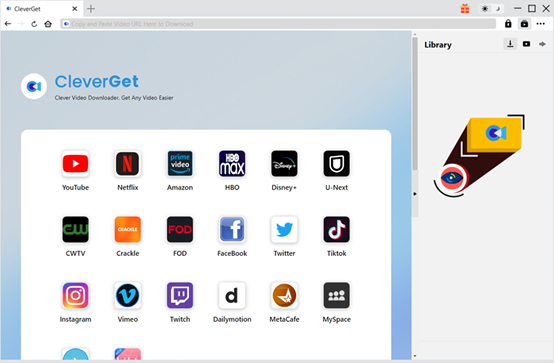
CleverGet is the sum of all CleverGet online video downloaders. Therefore, you can download its installation package from CleverGet's official website. After installing it on your computer, run it. Now, you can start downloading Paramount Plus videos by using CleverGet Paramount Plus Video Downloader.
Step 2: Set the output directory
CleverGet developers set default settings for CleverGet at the beginning, including the output directories for videos and audio, but you can change these default settings. Click the "..." button in the upper right corner of the client of CleverGet, and then click the "Settings" option in the list that pops up automatically. At this time, CleverGet will pop up a window called "Settings". Under the "General" panel in the "Settings" window, you can change the output directory for videos, the output directory for audio, the language of the client of CleverGet, etc. Finally, click the "Save" button to save all your changes.

Step 3: Find the target Paramount Plus video
CleverGet's built-in browser can help you access the Paramount Plus website directly in the client of CleverGet. Enter the Paramount Plus website in the address bar at the top of the client of CleverGet to access it directly. Log in to your Paramount Plus account on the Paramount Plus website, then find the Paramount Plus video you want to download and enter its playback page.

Step 4: Download the Paramount Plus video
CleverGet Paramount Plus Video Downloader will automatically detect whether the Paramount Plus video can be downloaded and all its related information. After the detection is completed, CleverGet Paramount Plus Video Downloader will automatically pop up a download window for you to set the format, subtitles, audio, etc. of the Paramount Plus video. After the settings are completed, you need to click the "Download" button to download the Paramount Plus video.

Note:
- CleverGet respects all copyright protection-related policies and laws and regulations, opposes any use of Paramount Plus videos for sharing and profit, and does not assume any responsibility for this.
FAQs
If you’re interested in learning more about Paramount Plus downloads, you can read these questions and answers:
1. Can you download movies on Paramount Plus on PC?
This tutorial mainly describes two ways to download movies from Paramount Plus. Among them, the Paramount Plus offline function is a function exclusive to the Paramount Plus App. Neither the Paramount Plus website nor the client program has this function. Therefore, you cannot download movies on PC directly from Paramount Plus. However, CleverGet Paramount Plus Video Downloader is specially designed for PC users and can help users download movies on PC from Paramount Plus.
2. Why do I fail to download videos in the Paramount Plus App?
This could be due to a variety of reasons. Firstly, you need to confirm your subscription status and make sure you still have a Paramount Plus premium membership. Then, this could also be caused by an unstable network connection. You can try to connect your device to a more stable network environment and then use the Paramount Plus App to download Paramount Plus videos again. Finally, Paramount Plus allows users to download a maximum of 25 Paramount Plus videos, and will prevent users from downloading the 26th Paramount Plus video. So, you need to confirm the number of Paramount Plus videos you have downloaded. If the number of Paramount Plus videos you have downloaded has reached 25, you need to delete some downloaded Paramount Plus videos before you can download new Paramount Plus videos.
3. Are there any ads in Paramount Plus videos downloaded by using CleverGet Paramount Plus Video Downloader or Paramount Plus App?
Fortunately, because it uses the most advanced video detection and downloading technology, CleverGet Paramount Plus Video Downloader can identify and remove ads in Paramount Plus videos when downloading Paramount Plus videos, providing us with a better video viewing experience. However, Paramount Plus videos we download by using the offline function of the Paramount Plus App may have pop-up ads during playback, which may cover part of the screen. It is very annoying.
Conclusion
Although the Paramount Plus App provides an offline function, Paramount Plus downloads have a limited time limit of up to 30 days. In addition, we may no longer subscribe to Paramount Plus for various reasons. In short, if we only use the Paramount Plus App, we cannot permanently save Paramount Plus downloads on our devices. Fortunately, CleverGet Paramount Plus Video Downloader solves this problem perfectly. You can consider using CleverGet Paramount Plus Video Downloader to download Paramount Plus videos to MP4 or MKV and save Paramount Plus downloads permanently.
-
How to Cancel Your YouTube TV SubscriptionSunny Wen/2026-03-27
-
YouTube TV vs Fubo for Sports Fans: Which One Wins?Sunny Wen/2026-03-27
-
Is Movavi Screen Recorder Worth It? Full Review and AlternativesSunny Wen/2026-03-26
-
Netflix vs HBO Max: Which Should You Choose?Cassie J./2026-03-11
-
How to DVR on YouTube TV and Fix Recording IssuesSunny Wen/2026-03-11
-
Loom Screen Recorder Guide: How It Works + Free Alternative ToolsSunny Wen/2026-03-26
-
Locoloader OnlyFans Downloader Review: Is It Really Working?Patrick Murray/2026-03-26
-
How to Download YouTube 8K Video Without Quality LossCassie J./2026-03-09
-
Disney Plus 8-Digit Code: How to Activate Your Account on Any DeviceLeia Liu/2026-03-06
-
Wondershare DVD Creator Review: Features, Test & PriceCassie J./2026-03-06





-
12 Best Sites Like BestGore for Shocking VideosAugust/2025-03-17
-
12 Best Sites Like BestGore for Shocking VideosAugust/2024-02-22
-
12 Best Free Web Series Download Websites 2026August/2025-02-05
-
Top 10 Sites to Download Anime FreeAugust/2024-12-27
-
Top 5 OnlyFans Viewer Tools to View OnlyFans FreeAugust/2024-04-29
-
Top 10 Websites to Watch Uncensored AnimeAugust/2024-02-21
-
[2026] AudioBookBay Proxy Sites & Alternatives for Free AudiobooksCassie J./2026-01-06
-
How to download videos from MissAV? – Ways to download MissAV JavPatrick Murray/2025-02-08
-
Top 10 OnlyFans Search to Find Someone on OnlyFansAugust/2024-02-29
-
7 Best Free Sites for Pinoy Movies Download in 2026August/2024-10-31


Comments are closed.