
How to use Leawo PowerPoint to Video Pro
This registration page shows you detailed steps on how to register and activate Leawo PowerPoint to Video Pro so as to let you convert PowerPoint to video without limitation.


- Home
- /
- Leawo PowerPoint to Video Pro
- /
- User Guide
How to Register Leawo PowerPoint to Video Pro
Leawo Software offers both free trial version and registered version of Leawo PowerPoint to Video Pro for worldwide customers. People could freely download Leawo PowerPoint to Video Pro to take a try.
1. Free trial version vs. registered version
Both free trial version and registered version of Leawo PowerPoint to Video Pro are free to download. However, the free trial version would keep a watermark on the output video file, while the registered version has no watermark. Meanwhile, the registered version enjoys prior tech support and free update from Leawo Software.
2. Register Leawo PowerPoint to Video Pro with license
If you've already got a license for Leawo PowerPoint to Video Pro, it would be quite easy for you to register Leawo PowerPoint to Video Pro. After you launch Leawo PowerPoint to Video Pro, you could see the below window:
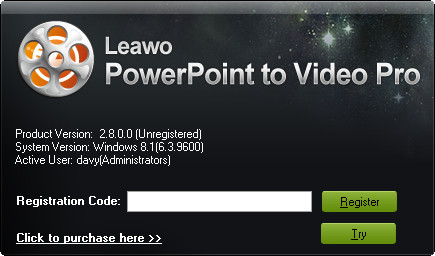
Copy and paste the license you've got into the Registration Code address bar and then click the green Register button  to register and activate Leawo PowerPoint to Video Pro.
You could also reach this registration code window by clicking the Menu button  on the top-right corner and then opening the "Help > Registration" option.
3. Register Leawo PowerPoint to Video Pro without license
If you haven't got a license code of Leawo PowerPoint to Video Pro, you need firstly purchase a license and then register it. To purchase Leawo PowerPoint to Video Pro license, you could directly visit Leawo PowerPoint to Video Pro purchase page, or click the Purchase button  to enter the purchase page. On the purchase page, you need to determine which kind of license you want: 1-Year license or Lifetime license. After payment, Leawo would send license code to you via email. Once you get the license, you could register and activate Leawo PowerPoint to Video Pro as mentioned above.