
How to Use Leawo Blu-ray Creator
This guide shows you how to get help on Leawo Blu-ray Creator to better use this program.


- Home
- /
- Leawo Blu-ray Creator
- /
- User Guide
Help center
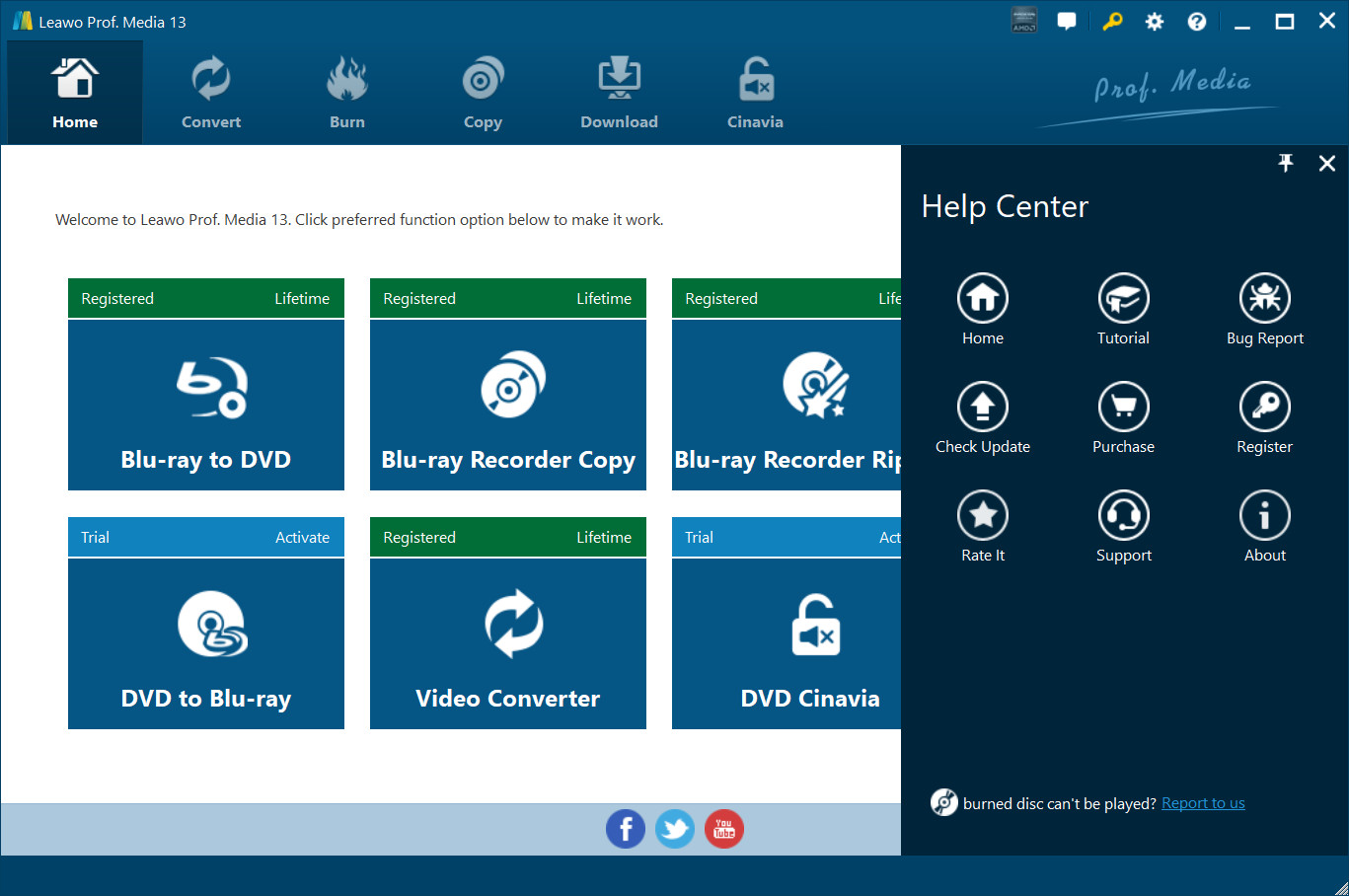
Click “Help Center”  button to open the “Help Center”.
a. Home
Click Home  button and it’ll take you to the product page of Leawo Software.
b. Totorial
Click Tutorial  button and it’ll take you to the page with user guide of different function modules on Prof. Media.
c. Bug Report
If you came across some bugs during usage, click  to send a feedback to us and we’ll fix them as soon as possible. You’ll need to put in your name, E-mail address, description of the bug and if some specific files are involved, the files.
d. Check Update
Click Check Update  button to check if there’s new update available.
e. Purchase
Click Purchase  button to buy the product for one-year or lifetime validation.
f. Register
Click Register  button to enter the registration code after you purchase the product to activate the program.
g. Rate it
Click Rate It  to rate and comment on the program.
h. Support
Click Support  button to go to the support page of Leawo Software where you can find some FAQs and user guides.
i. About
Click About  to check out some information about the Leawo Prof. Media.