feature
Convert PPT to DVD/BD Content

Burn PowerPoint to DVD/Blu-ray disc, folder and/or ISO file

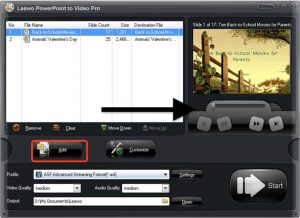
Leawo PowerPoint to DVD Pro is a powerful and effective PowerPoint to DVD converter, which is designed to provide comprehensive, professional but easy-to-use solution for Office users to convert PowerPoint to DVD/Blu-ray disc, folder or ISO file for multiple uses. Working as PowerPoint to DVD burner, it could convert and burn PowerPoint to DVD for playback on TV and DVD player. Apart from converting PowerPoint to DVD, it is also regarded as a PowerPoint to Blu-ray burner since it is able to burn PPT to Blu-ray disc for playback on various Blu-ray players. In short, with this PPT to DVD Converter, you can burn PowerPoint to DVD/Blu-ray movie for enjoying on TV or projector with DVD/Blu-ray player.
Convert PPT to Video/Audio

Convert PowerPoint to video and audio in 180+ formats

In addition to working as a PowerPoint to DVD/Blu-ray converter, Leawo PowerPoint to DVD Pro can also be regarded as a PowerPoint to video converter as it is able to convert PowerPoint to video and audio in 180+ formats, including common video formats (MP4, AVI, MKV, MOV, FLV, WMV, MPEG, VOB, MPG, etc.), common audio formats (MP3, OGG, AAC, AC3, WAV, WMA, etc.), HD video formats and other formats for portable gadgets like iPod, iPhone, iPad, PSP, PS3, tablet PC, Apple TV, Windows Phone, Android Mobile, Xbox etc. In a word, with this PowerPoint to video converter, you are able to play PowerPoint files on any portable media players.
feature
feature
Retain All Elements

Keep all elements from PowerPoint to DVD, Blu-ray Disc and video

This PPT to DVD/Blu-ray/video converter is equipped with advanced technology which allows it to keep all elements of source PowerPoint files after converting PowerPoint to DVD/Blu-ray/video, including animations, transitions, background music, voice narrations and movie clips, etc. Besides, it can well synchronize audio and video in the output video/DVD/Blu-ray file.
Chapter Schemes

Provide 2 flexible chapter schemes

Leawo PowerPoint to DVD Pro provides you with 2 flexible chapter schemes: One Slide One Chapter and One Animation One Chapter. The mode of “One Slide One Chapter” is designed to help novice users to avoid some unnecessary repeats in PowerPoint. And the mode of “One Animation One Chapter” is designed to satisfy teachers and business men’s lecture purposes. You can choose either of them as you like.
feature
feature
Customize PPT for DVD/BD

Add background music, pictures & record real-time narration

Before converting PowerPoint to video/DVD/Blu-ray disc, Leawo PowerPoint to DVD Pro allows you to add your favorite song as background music to play across certain slides or whole slideshow. And it also allows you to add a desirable picture as the thumbnail of the slide. Besides, you are also able to record sounds like narrations and instructions to the output DVD, Blu-ray Disc or video.
Available Menu Templates

Provide plenty of DVD/Blu-ray menu templates

When you burn PowerPoint to DVD or Blu-ray disc, a suitable menu might be necessary. Whether you want to convert PowerPoint to DVD or Blu-ray disc, this PPT to DVD Converter will offer a wide range of customized beautiful DVD/Blu-ray disc menus to let you choose or customize your disc menus easily. Those DVD/Blu-ray menus are designed for many different occasions like themes of Standard, Business, Education, Holiday, Nature, Sports, etc.
feature
Download Leawo PowerPoint to DVD Pro for Mac Now !
  • 20+ Years Experience

  • 10,000,000+ Happy Clients

  • 100% Safe & Clean

  • 100+ Countries

How to Convert PowerPoint to Video/DVD/Blu-ray

Step 1: Add source PowerPoint file

Click the “Import” button to browse and add source PowerPoint files from computer.

Step 2: Set output

Open the “Options” tab to set output type (video, DVD or Blu-ray) and output folder.

Step 3: Customize output

Set output format for converting PowerPoint to video, or customize disc menu, background music, logo for burning to DVD/Blu-ray

Step 4: Start converting

Click the “Start” button to start converting PowerPoint to video files or burning PowerPoint to DVD/Blu-ray.

Visit Full User Guide >
Step1 Step2 Step3 Step4

    System Requirments

    Leawo PowerPoint to DVD Pro
    Languages
    中文 English Japan deutsch francais Italiano Español 한국어

    Size 29.8 MB

    Version

    Update

    • Microsoft PowerPoint Version : PowerPoint 2000/2002/2003/2007/2010/2013/2016/2019, PowerPoint Viewer 2007/2010
    • Supported OS : Microsoft® Windows 7, Windows 8, Windows 8.1, Windows 10, Windows 11
    • Processor : 1 GHz or above Intel/AMD Processor
    • RAM : 256MB at least
    • Free Hard Disk : 2GB or larger of free space
    • Others : DirectX 8.1 or above; Windows-compatible sound card
    button

    Testimonials

    What Our Clients Say

    • avatar

      "

      Leawo PowerPoint to DVD Pro is a great solution for anyone needing to convert their PowerPoint presentations to more popular file formats such as videos.

      • star
      • star
      • star
      • star
      • star

      Software Informer Editor

    • avatar

      "

      You then create a standard DVD, convert to a video file or create a Blu-Ray DVD. That should take out worries about DVD formats for some time! Looks like a very good option for easily distributable presentations.

      • star
      • star
      • star
      • star
      • star

      Free Downloads Center Editor

    • avatar

      "

      just bought ppt to dvd-r no prior experience. Needed memorial dvd-r in less than an hour 15 minutes Done! Excellent!... Thank you so much!

      • star
      • star
      • star
      • star
      • star

      Ms. Brown

    button
    close

    Purchase Leawo PowerPoint to DVD Pro for Mac

    1 Year

    $ 79.95

    • 1 License for 1 PC
    • All Features for 1 Year
    • Auto-renewal. Cancel Anytime
    • 5 Days Money Back Guarantee
    • Unlimited Free Upgrades
    Top Seller
    Lifetime

    $ 119.95

    • 1 License for 1 PC
    • All Features for Lifetime
    • One-time Payment
    • 14 Days Money Back Guarantee
    • Unlimited Free Upgrades
    We Accept: