



 Try for Free
 Try for Free


Apple didn't add Blu-ray support in its Mac computer. But with external Blu-ray drive or special Blu-ray player, you could still watch Blu-ray movies or back up Blu-ray movie on Mac. Some people may want to convert Blu-ray folder file to ISO files on Mac or PC for personal uses. This guide provides detailed explanation on folder and ISO file, and effective solution to help you convert folder to ISO file on Mac with professional Blu-ray converter tools.
Part 1: Blu-ray Disc, Folder and ISO Image File
Among these 3 different types of media, Blu-ray disc is without doubt the most familiar media container to movie fans, capable of storing high-definition video resolution (1080p), while Blu-ray folder and ISO file could be considered as derive media files from Blu-ray disc.
In specific, ISO image file is a perfect copy of Blu-ray/DVD disc with all the menus, extras, and everything intact. People could rip discs to ISO file so they get a perfect copy and can use that perfect copy to create new copies in the future. A Blu-ray Folder is a folder which contains the whole contents of a Blu-ray disc. It usually contains 2 separate folders: BDMV and CERTIFICATE. BDMV folder contains information about the contents of the Blu-ray disc, while CERTIFICATE is empty, but necessary for the disc to play back correctly on some devices. Under a BDMV folder/directory, there are many folders and files, including AUXDATA, BACKUP, BDJO, CLIPINF, JAR, META, PLAYLIST and STREAM directories, and 2 bdmv files. Some folders are empty.
There aren't any particularly big downsides to having your files in either format (ISO or the folder structure). Unless your plan on playing the movies on a network device or media player that is really finicky about one format there's no compelling reason to go through the effort of converting all your lose TS folders to ISO files. Not all Blu-ray ISO burning software will be able to convert Blu-ray folder files to ISO file on Mac. Leawo Blu-ray Copy for Mac could help you create ISO from folder (both Blu-ray and DVD) easily on Mac.
Part 2: Why Convert Blu-ray Folder File to ISO Image File
It is funny to learn that Apple does not support Blu-ray natively. Out of the box, your Mac can do almost anything, but playing Blu-ray movies isn't one of them. Not only does Macs not ship with Blu-ray playback software built-in, but Apple still doesn't make a drive capable of reading Blu-ray discs. That prevents users from streaming Blu-ray directly on Mac. Fortunately, some programs are developed to fix the problem of being not able to play Blu-ray on Mac, among which some will help you get ISO file from Blu-ray folder files so as to make Blu-ray ISO file playable on Mac directly.
In the following section, we will introduce the top-ranked programs for converting Blu-ray folder files to ISO files with minimum efforts required.
Part 3: How to Copy Blu-ray Folder File to ISO File
With the right Blu-ray converter, it's not difficult to convert folder from Blu-ray to ISO on Mac/PC at all. Leawo Blu-ray Copy for Mac is a top-rated Blu-ray ISO burning software application that could easily make ISO from folder in only a few simple clicks. The below steps would show you how to convert a folder of Blu-ray to ISO file on Mac. Download and install this Mac Blu-ray backup tool on your Mac computer. Then, follow these steps to learn how to create ISO from folder using Leawo DVD Copy for Mac.
Before stepping into the detailed procedures, make sure you have already been aware of these things:
- Download and install Leawo's Blu-ray folder converter (officially known as Blu-ray Copy) on your computer.
- Mac OS X 10.6 or newer (Windows Vista, XP, 7, 8 or 8.1), with Blu-ray recorder drive installed.
- Source Blu-ray folder and enough computer hard drive.
- Internet connection.
Step 1: Add Blu-ray folder
Click the "Add Blu-ray/DVD" button to browse and add the BDMV folder you want to convert to ISO file into this Blu-ray Copy. After loading, select output disc type and copy mode (Full Movie, Main Movie and Custom Mode) from the bottom left corner.
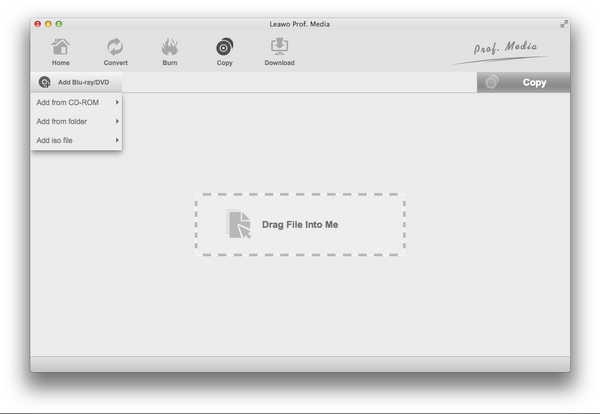
Step 2: Settings
Click the big green "Copy" button on the top-right corner to complete Blu-ray folder to ISO conversion settings. You have "Copy to", "Disc Label" and "Save to" options. Select "ISO file" under the "Copy to" option.
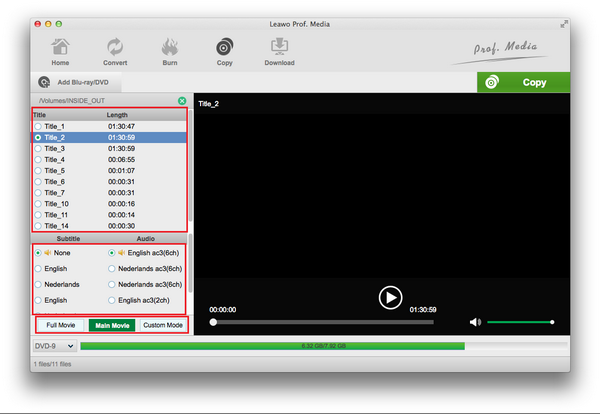
Step 3: Convert Folder from Blu-ray to ISO File
At last, click the "Copy" button at the bottom of the settings panel. This Mac Blu-ray folder converter would start to convert Blu-ray folder to ISO file immediately.
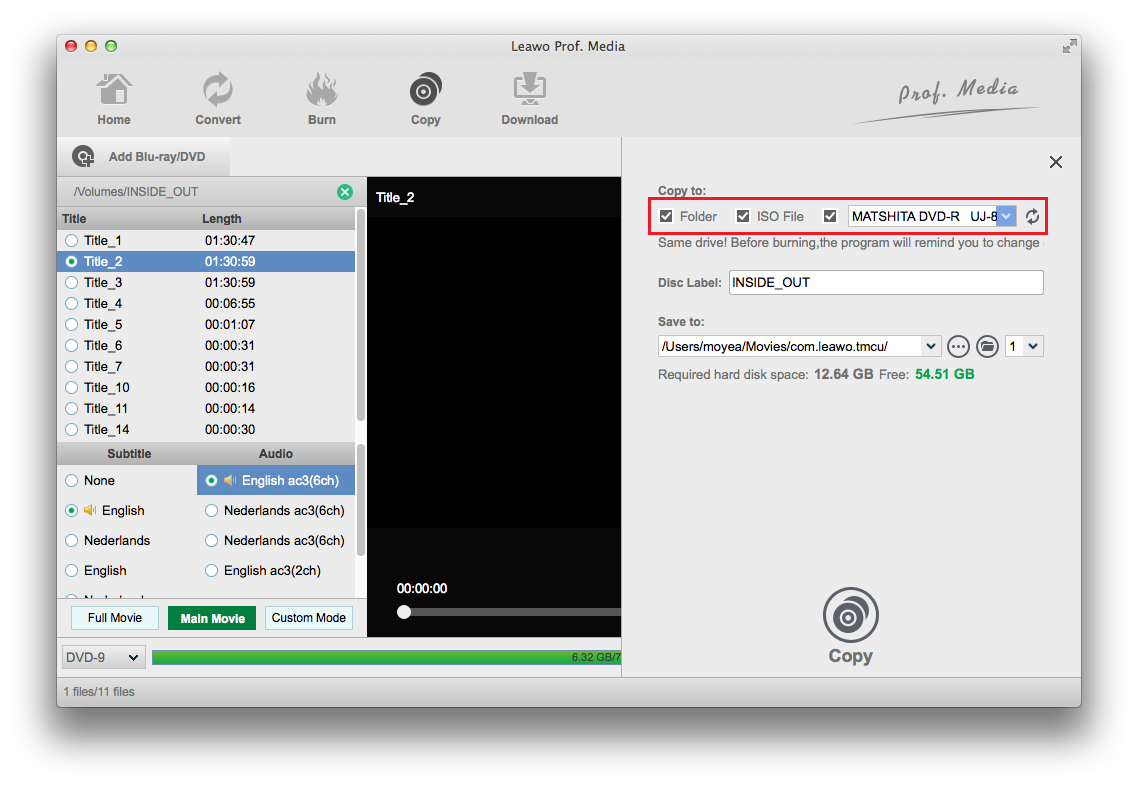
Part 4: 3 Other Alternative Tools to Copy Blu-ray Folder to ISO
Apart from Leawo Blu-ray Copy, the leading tool for users to copy DVD disc or Blu-ray to folders, ISO files, and even new discs, we have other trusted alternatives to let you get ISO file from Blu-ray folder files within clicks.
1. Aurora Mac Blu-ray Copy
In order to copy Blu-ray to ISO image file, freeware like Aurora Mac Blu-ray Copy is worth mention here. This program is free and especially designed for clone/burn/backup any Blu-ray on Mac. With this Free Blu-ray Copy for Mac, you can easily copy Blu-ray disc directly, backup into hard disc as ISO image file and burn the ISO image file into disc as you want. This Mac Blu-ray copy tool can copy your Blu-ray without any quality loss and is easy to handle.
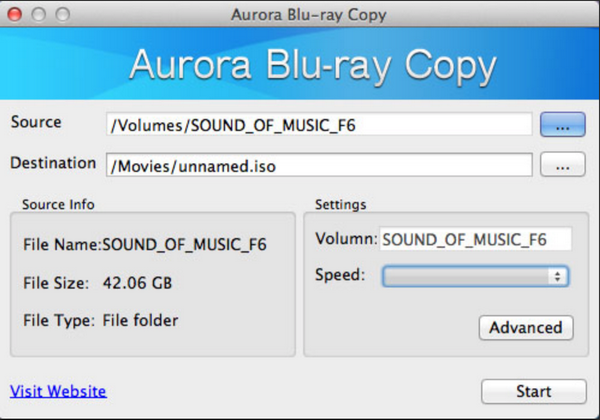
2. Nero Standard 2019 Suite
It is a high-quality Blu-ray writing software that also burns DVDs and CDs. However, it does not have the decryption functionality like Leawo Blu-ray Copy. It can copy noncommercial discs, and it can do some basic editing to produce the kinds of discs you want. The software can span large files over multiple discs, just in case you are worried about limited space. This software is a great choice if you would like to burn Blu-ray movies. It costs a whopping $109.99, while Leawo Blu-ray Copy costs only $44.95.
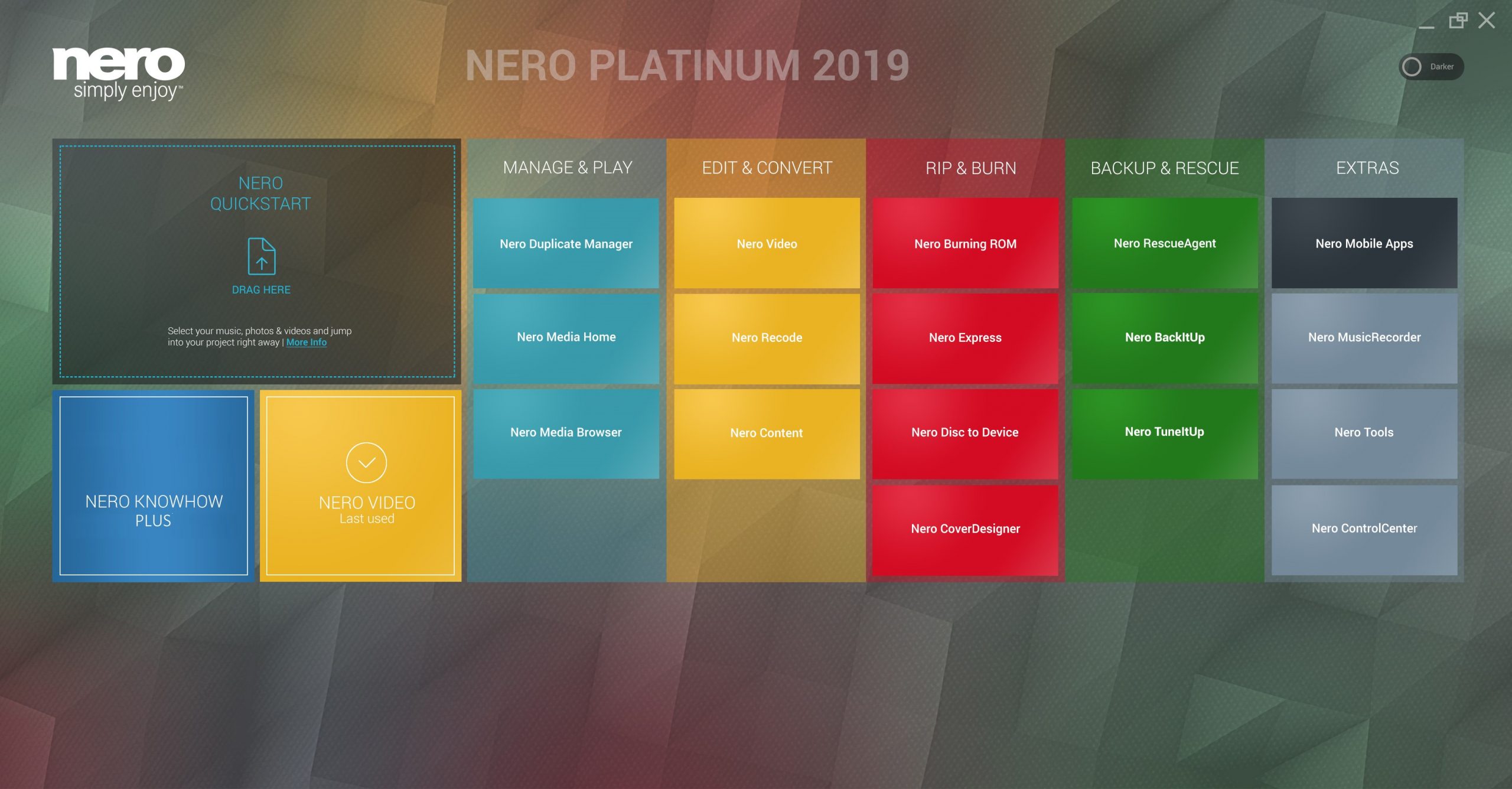
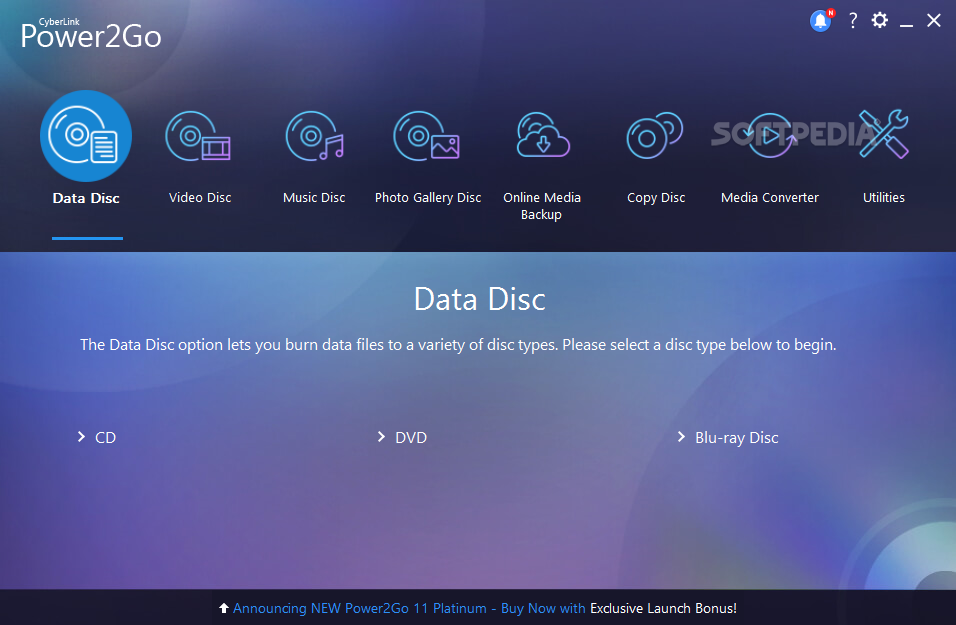
3. CyberLink Power2Go 13
CyberLink Power2Go is actually an all-inclusive media solution combo that enables you to burn and create CD, DVD, and Blu-ray Discs, convert video and audio files for transferring to multiple portable devices for mobile entertainment. You can also back-up and recover Windows system files, and download videos from popular websites like YouTube. Although this software lacks a commercial Blu-ray disc decryption function (which could be done with a third-party plugin), the program is user-friendly, easy to understand, and a decent choice for backing up data and personal media such as photos. It will set you back $69.99 for the full version license.
Part 5: Comparison among these 4 products
We first introduced the terms ISO file, Blu-ray Disc, and Blu-ray folder and what they mean in the technical perspective. Although the Apple macOS system does not natively support Blu-ray playback, we introduced Leawo Blu-ray Copy, an advanced software tool that adds the support. It helps users with Blu-ray backup to ISO image files within clicks and without loss of quality. We also introduced several other tools that can be employed for this job, and now we will briefly compare these software tools.
| Leawo Blu-ray Copy | Nero Standard 2019 Suite | CyberLink Power2Go 13 | Aurora Mac Blu-ray Copy | |
| Operating systems | Windows, macOS | Windows | Windows | macOS |
| Downward compatibility with CD/ DVD discs | CDs, DVDs supported | CDs, DVDs supported | CDs, DVDs supported | No |
| Decryption functionalities | AACS, BD+, MKB | No | No | AACS, BD+ |
| Conversion speeds | 6x higher | Normal speeds | Normal speeds | Normal speeds |
| Price | $44.95 | $109.99 | $69.99 | Free |
-

ScreenPal Review: Is It Worth Using?Sunny Wen/2026-02-09
-
Best Free Screen Recorders for Desktop and MobileSunny Wen/2026-02-08
-
How to Save Facebook Videos on PCSunny Wen/2026-02-08
-
KeepVid Review 2026: Is It Safe, LegitLeia/2026-02-05
-
4K Video Downloader Plus Review: Features, Price & LimitsCassie J./2026-02-05
-
SameMovie All-In-One Video Downloader Review: All ExplainedPatrick Murray/2026-02-04
-
Prime Video Subscription Explained: Make the Best Use of ItPatrick Murray/2026-02-04
-
Can You Screen Record Instagram Stories? What You Should KnowSunny Wen/2026-01-27
-
MovPilot Review 2026: Features, Performance, Pros & ConsLeia/2026-01-22
-
WinX DVD Author Review: Still Good for Creating DVDs?Cassie J./2026-01-19


-
12 Best Sites Like BestGore for Shocking VideosAugust/2025-03-17
-
12 Best Sites Like BestGore for Shocking VideosAugust/2024-02-22
-
12 Best Free Web Series Download Websites 2025August/2025-02-05
-
Top 10 Sites to Download Anime FreeAugust/2024-12-27
-
Top 5 OnlyFans Viewer Tools to View OnlyFans FreeAugust/2024-04-29
-
Top 10 Websites to Watch Uncensored AnimeAugust/2024-02-21
-
[2026] AudioBookBay Proxy Sites & Alternatives for Free AudiobooksCassie J./2026-01-06
-
How to download videos from MissAV? – Ways to download MissAV JavPatrick Murray/2025-02-08
-
Top 10 OnlyFans Search to Find Someone on OnlyFansAugust/2024-02-29
-
7 Best Free Sites for Pinoy Movies Download in 2025August/2024-10-31


